bench –site your_sitename enable-scheduler
bench doctor
https://frappeframework.com/docs/user/en/bench/guides/diagnosing-the-scheduler
bench –site gor.site.com show-pending-jobs
$ bench –site [site-name] trigger-scheduler-event all
bench –site your_sitename enable-scheduler
bench doctor
https://frappeframework.com/docs/user/en/bench/guides/diagnosing-the-scheduler
bench –site gor.site.com show-pending-jobs
$ bench –site [site-name] trigger-scheduler-event all
bench –site [sitename] backup –with-files
bench --site www.site.com uninstall-app meeting
BackUp
bench backup –with-files
bench –site backup –with-files
bench backup
bench backup-all-sites
bench –site [sitename] uninstall-app [app]
root@erp:/home/frappe/frappe-bench# bench –site xx.aaa.com –force restore 20171005_004314_883fdeba_database.sql
bench –site aa.site.com –force restore sites/aaaaa/private/backups/20180402_010035_29d7966e_database.sql
root@erp:/home/frappe/frappe-bench/apps# cd ..
root@erp:/home/frappe/frappe-bench# bench –help | grep uninstall
uninstall-app Remove app and linked modules from site
root@erp:/home/frappe/frappe-bench#
root@erp:/home/frappe/frappe-bench# bench –help | grep remove
remove-app completely remove app from bench
remove-from-installed-apps Remove app from site’s installed-apps list
| Event Name | Description |
|---|---|
setup |
Triggered once when the form is created for the first time |
before_load |
Triggered before the form is about to load |
onload |
Triggered when the form is loaded and is about to render |
refresh |
Triggered when the form is loaded and rendered. |
onload_post_render |
Triggered after the form is loaded and rendered |
validate |
Triggered before before_save |
before_save |
Triggered before save is called |
after_save |
Triggered after form is saved |
before_submit |
Triggered before submit is called |
on_submit |
Triggered after form is submitted |
before_cancel |
Triggered before cancel is called |
after_cancel |
Triggered after form is cancelled |
timeline_refresh |
Triggered after form timeline is rendered |
{fieldname}_on_form_rendered |
Triggered when a row is opened as a form in a Table field |
{fieldname} |
Triggered when the value of fieldname is changed |
https://github.com/frappe/frappe/wiki/Developer-Cheatsheet#1-to-add-a-new-handler-on-value-change
http://pcbbc.site.mobi/templates/mobile/facade_transcoder_iframe.php?u=%2Ffrappe%2Ffrappe%2Fwiki%2FClient-Side-Scripting-Index%3Fimz_s%3Dqc84i7nnq3l78t0hqno42b7rk6&lang=en
https://wiki.erpnext.org/display/ENG/Add+a+Custom+Button
Call api to get values of another doc type from a given doctype
frappe.ui.form.on(“Document Record”, {
onload_post_render: function(frm) {
// This function is run right after a Sales Invoice is rendered and loaded
cur_frm.set_value(“document_by”,user);
if(user ==”Administrator”){alert(“FKNote: No details for the sender was fetched since there is no employee for Administrator, the system will now show you an error … in order for details to be fetched an account has to be created”)}
var container;
frappe.call({
‘method’: ‘frappe.client.get’,
‘args’: {
‘doctype’: ‘Purchase Order’,
‘fieldname’: ‘title’,
‘filters’: { ‘owner’: user, ‘name’:”PO-04565″}
}
,
callback: function(r){
// msgprint(r.message.salutation);
console.log(r)
container = r.message.company +”\n”+r.message.salutation +”. “+r.message.employee_name +”\n”+r.message.designation +”\n”+ r.message.company_email+”\n”+ r.message.cell_number
cur_frm.set_value(“sender_details”,container);
cur_frm.set_value(fieldname, r.message);
}
});
// https://github.com/frappe/frappe/wiki/Developer-Cheatsheet
// This listener is added to the customer field, listening for a keypress event
// cur_frm.fields_dict.customer.$input.on(“keypress”, function(evt){
// Code specified here will run when a key is pressed on the customer field.
// });
}
});
//var x = document.getElementsByClassName(“ellipsis title-text”);
//var bb = x[0].innerHTML;
//alert(bb)
//if( ! bb.indexOf(“Document”) !== -1){}else{
//cur_frm.set_value(“document_ref_test”, x[0].innerHTML );
//}
//var ss = document.getElementsByClassName(“control-input”);
//ss[0].innerHTML = bb;
//https://pcbbc.site.mobi/templates/mobile/facade_transcoder_iframe.php?u=%2Ffrappe%2Ffrappe%2Fwiki%2FClient-Side-Scripting-Index%3Fimz_s%3Dqc84i7nnq3l78t0hqno42b7rk6&lang=en
Once the bench is installed, you will see two main folders, apps and sites. All the applications will be installed in apps.
To make a new application, go to your bench folder and run, bench new-app {app_name} and fill in details about the application. This will create a boilerplate application for you.
$ bench new-app library_management
App Title (defaut: Lib Mgt): Library Management
App Description:  App for managing Articles, Members, Memberships and Transactions for Libraries
App Publisher: Frappé
App Email: info@frappe.io
App Icon (default 'octicon octicon-file-directory'): octicon octicon-book
App Color (default 'grey'): #589494
App License (default 'MIT'): GNU General Public License
The application will be created in a folder called library_management and will have the following structure:
.
├── MANIFEST.in
├── README.md
├── library_management
│   ├── __init__.py
│   ├── config
│   │   ├── __init__.py
│   │   └── desktop.py
│   ├── hooks.py
│   ├── library_management
│   │   └── __init__.py
│   ├── modules.txt
│   ├── patches.txt
│   └── templates
│       ├── __init__.py
│       ├── generators
│       │   └── __init__.py
│       ├── pages
│       │   └── __init__.py
│       └── statics
├── license.txt
├── requirements.txt
└── setup.py
config folder contains application configuration infodesktop.py is where desktop icons can be added to the Deskhooks.py is where integrations with the environment and other applications is mentioned.library_management (inner) is a module that is bootstrapped. In Frappé, a module is where model and controller files reside.modules.txt contains list of modules in the app. When you create a new module, it is required that you update it in this file.patches.txt is where migration patches are written. They are python module references using the dot notation.templates is the folder where web view templates are maintained. Templates for Login and other standard pages are bootstrapped in frappe.generators are where templates for models are maintained, where each model instance has a separte web route, for example a Blog Post where each post has its unique web url. In Frappé, the templating engine used is Jinja2pages is where single route templates are maintained. For example for a “/blog” type of page.You can
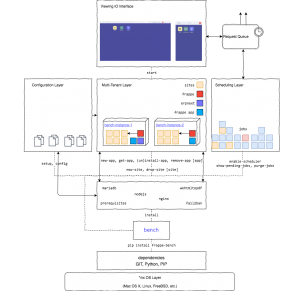
Assuming that you’ve already got your first site running and you’ve performed the production deployment steps, this section explains how to host your second site (and more). Your first site is automatically set as default site. You can change it with the command,
bench use sitename
You can create a new site and make run it on a different port (while the first one runs on port 80).
bench new-site site2name
bench set-nginx-port site2name 82
bench setup nginx
sudo service nginx reload
You can name your sites as the hostnames that would resolve to it. Thus, all the sites you add to the bench would run on the same port and will be automatically selected based on the hostname.
DNS based multitenancy mode is disabled by default, you can switch it on / off using the command,
bench config dns_multitenant on
To make a new site under DNS based multitenancy, perform the following steps.
bench new-site site2name
bench setup nginx
sudo service nginx reload
Note : For “DNS based multitenancy”, currentsite.txt in frappe-bench/sites/ should be empty.
Source: https://github.com/frappe/bench/wiki/Multitenant-Setup
Here are steps to install frappe
https://frappe.io/docs/user/en/bench/resources/bench-commands-cheatsheet
https://github.com/frappe/bench/wiki/Quick-Reference-Guide
https://github.com/frappe/bench/wiki/Quick-Reference-Guide
https://frappe.io/docs/user/en/bench/resources
Back Up SIte with all files: bench –site all backup –with-files
Show current tasks of Ubuntu: netstat -punta |grep nginx |wc -l
MYSQL:
mysql -u root -p
Database:
select * from `tabPayment Entry` where base_total_allocated_amount=24;
Frappe and site:
bench version, gives you the verison of the bench and frappe and erpnext etc
bench drop-site [sitename] This will remove the site folder and the database as well.
Install cusjtom frappe apps by fra: bench get-app meeting https://github.com/frappe/meeting
https://frappe.io/docs/user/en/bench/resources
Cache
The ps command is a traditional Ubuntu Linux command to lists running processes. The following command shows all processes running on your system:
{vivek@ubuntu-box:~}$ ps -aux

{vivek@ubuntu-box:~}$ sudo ps -a

{vivek@ubuntu-box:~}$ sudo ps -U vivek

{vivek@ubuntu-box:~}$ ps -U tom
https://www.cyberciti.biz/faq/how-to-check-running-process-in-ubuntu-linux-using-command-line/